Based on recent site analytics, we’re seeing an increase in the number of Cricut users wanting the ability to cut SVG files with their machines! Did you know that it was once possible to purchase software that gave Cricut users the ability to do just that? Sure Cuts A Lot 2 and Make The Cut software were available for purchase and compatible with the Cricut Personal, Cricut Cake (12×12 and 6×12), Cricut Expression and original Cricut cutting machines.
Lawsuits
Initially, ProvoCraft filed a lawsuit against Make The Cut, a few months later the case was settled out of court and Make The Cut stopped selling the Cricut compatible version of their software. The software is still available and works with a variety of cutting machines (Pazzles Inspiration, eCraft from Craftwell, Boss Kut Gazelle etc), but no longer supports Cricut Machines. A few months later, Craft Edge (the maker of Sure Cuts A Lot 2) was also hit with a lawsuit. Sure Cuts A Lot 2 was taken off of the market and was replaced by Sure Cuts A Lot 3, which no longer supports Cricut machines.
Cutting SVG Files With Cricut Craft Room
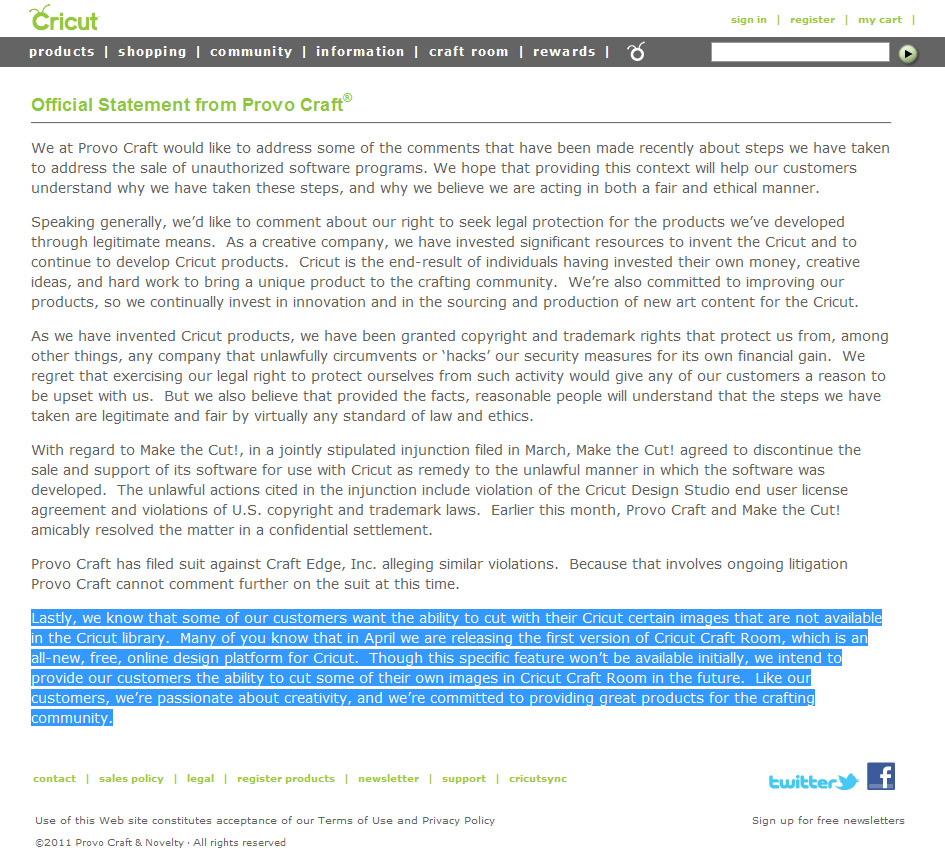
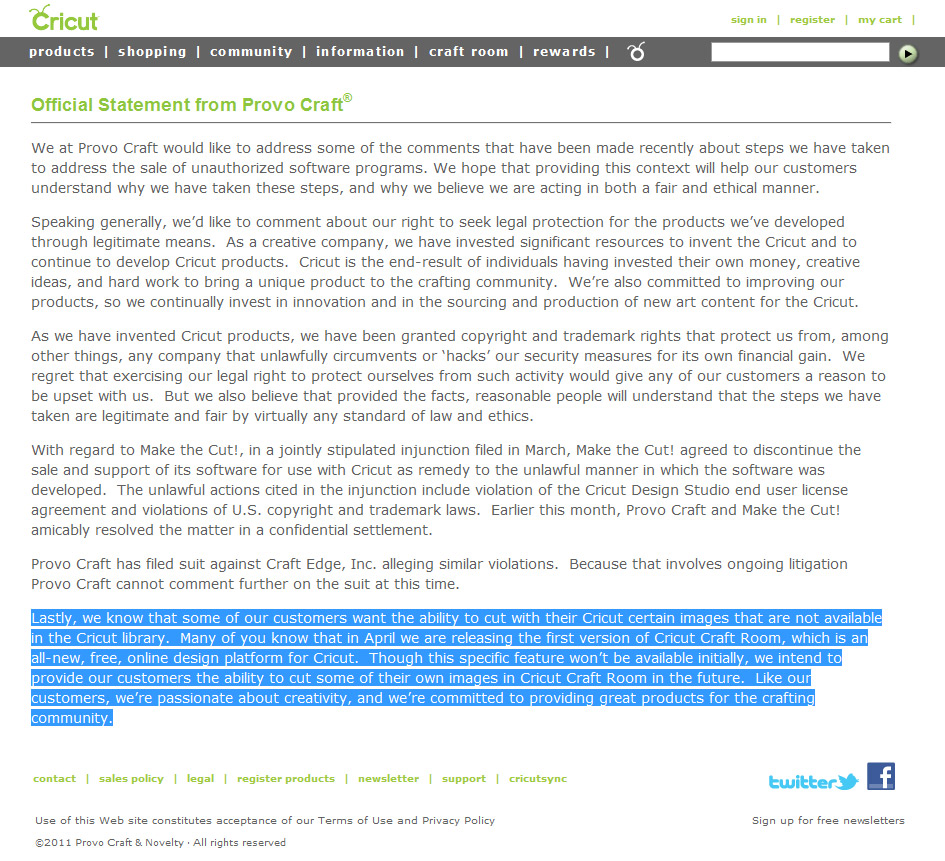
In the spring of 2011, Cricut posted a statement (see the image at the top of this post) that explained and defended their actions. We agree with their statement and understand how important it is to protect intellectual property and prosecute those that illegally circumvent security measures for one’s own financial gain. Would ProvoCraft have been open to creating an approved version of Sure Cuts A Lot for the Cricut? We’ll never know, but what we do know is that they realize the importance of creative freedom and stated that they would “provide their customers the ability to cut some of their own images in Cricut Craft Room in the future“.
When Will I Be Able To Cut SVG Files In Cricut Craft Room?
We’re not sure! We’ve contacted ProvoCraft support and asked them just that, but they didn’t have any information on when the feature would be available. We suggest that you contact ProvoCraft and ask them! It would also be a great idea to express that you specifically want support for SVG files! Here are some of the ways you can contact them.
You can email: support@cricut.com
You can call: 801.932.1144 or 877.7CRICUT
Facebook: https://www.facebook.com/OfficialCricut
SVG Files and Cricut Cutting Machines
Is any version of Sure Cuts A Lot compatible with the Cricut Expression 2?
Can I cut SVG files with Cricut Design Studio?
Can upgrading my Cricut's firmware cause me to lose the ability to use Sure Cuts A Lot 2?
I already own Sure Cuts A Lot 2, can I still cut SVG files?
I just purchased a Cricut and want to cut SVG files. Is that possible?


Somehow PC suing people who make excellent software while PC’s software fails by comparison does not sound like they are putting their customers first. I believe the motive behind these lawsuits had a lot more to do with cartridge sales and limiting crafters than protecting intellectual property. The whole thing just did not seem to be in the best interest of their customers and ultimately PC as this caused many people to discontinue using their products. Perhaps that is why they may someday allow people to cut their own images. But if you know PC they are not quick to do anything. And what exactly does it mean to say “some of their own images”? Sounds pretty wishy washy to me! Just my humble opinion.
I agree. If the price of the cartridges were more “reasonable” and the images more versatile I would buy more.
I totally agree with you Cindy… When someone is in the market for a cutting machine, ProvoCraft/Cricut will bend over backwards and promise you the world to hook you into purchasing their product—but once you get it—-it’s YOU that’s bending over, and “that ain’t backwards either”
There is a group of us who are working with a law firm to fight back against ProvoCraft/Cricut for the injunction/lawsuit that prohibits anyone from obtaining a cutting program that would allow the cutting of any image on one’s own machine. Would anyone else be interested in joining a class action suite against ProvoCraft/Cricut? The MAJOR issue we all have with them is the way the lawsuit/injunction against purchasing any software that works on a cricut type machine, is the fact that they refer to these machines as being “THEIR’S”…they constantly use the term “OUR machines”. WELL, I’m sorry , but when I paid $299.00, that cricut machine became MINE, and is not one of their “OUR” machines…therefore, I should be afforded the ability to purchase a software program that performs as I want it to perform, and makes MY machine perform as I want it to perform. By their injunction, I have a machine that is restricted, and not able to do what I want….therefore, I am dissatisfied with their products, and should receive some type of compensation.
Anyone wishing to join our class action suit, please let us know, first, by a reply below. If enough people are interested on this blog, we’ll begin communications and going forward with our plans…
Installed CCR and sure enough it updated the firmware to 2.43 and SCAL 2 won’t work. These bastards obsoleted over 1,500 images collected over time. We are looking at the possibility of dumping the Critcut and picking up a Sizzix eclips machine.
I’ve written Cricut but have not gotten any answer. I hope their strategy fails and they go bankrupt
So since my Cricut has the 2.43 firmware the SCAL2 won’t work at all with the Cricut Expression I have. The Cricut was given to me by a friend and I just started looking around and finding information on how best you use it. This sucks if I am limited to cartridge only stuff.
I am a digital art designer, and I would love to be able to cut my images for the scrap-booking kits I make. Right now I can only make digital kits. I want to make my own tags with my images, but either have to hand paint or cut out by hand. I can’t use any other programs with cricut. Is there any other machines that you can use to cut your own images?
From my understanding of eclips which i bought one,
and with the eCAL software (for use with your computer and eclips electronic shape cutting machine), you can create and modify your own design….furthermore, the eclips can draw as well…if you buy the accessories…
I am a designer too… i am looking forward to do more on this machine once i got the little problem i had with this machine sorted out.
Silhouette Cameo
Jeffrey, I agree! Once bought it is now my machine. If it is “our” machine, then maybe they’d like to kindly contribute a bit to the supplies “our” machine needs. Count Me In!
I purchased a Sizzix Eclips about 5 months ago and within the first hour using it I realized I would never use my Cricut again. My Cricut was only 2 years old and was a gift from my husband. With his permission I put it on Craigs list(along with a few cartridges and the Gypsy I got on closeout at Michaels) and the same day had more cash than my Sizzix and SCal software costs. Why waste the energy struggling with a company that doesn’t put customers first? Cut your losses and get an Eclips!
In the 5 months I have owned my Eclips I have used it far more than the entire 2 years I owned a Cricut.
I am interested! Sign me up. I designed my own company logo and I can not cut it on my Cricut. I feel like buying a machine that the Sure Cuts A Lot program works with, and returning my Cricut. They should lower their stupid prices too – over-priced and most of the images are not usable for me.
I totally a greed also I have MTC but I cannot use it because this mess and I will not buy PC products any more!!
I agree with everything you said above. I want to be able to cut SVG files
along with my cricut cartridges on my cricut expression machine.
I would love to join the group. I am tired of having to dish out the money for cartridges that I can use/ only want to use one or two of the images. I also do crafts for our high school & would like to use our band logo & twirler images for good luck gifts, etc. I know these images will NEVER be on CCR! Please keep me informed.
I’m thrilled to hear this. I’m needing to update my Cricut this month to use CCR for my workshops. I’m so thankful you are on top of the current status. It’s giving me a bit of peace of mind!
I’m new to all this Sure Cuts A lot stuff. I have a Cricut Expression and i just got my hands on the sure cuts a lot 2 software. If i update my cricut now, will i be able to use the software with my cricut? Will my cricut work at all?
Yes you should be able to.
what about SCAL Version 1. I’ve hesitated upgrading my Cricut Expression software for fear of losing that capability.
Jemma,
is there anyway I can get my hands on a copy of the sure cuts a lot?? If so please tell me how! I would love not to have to spend what some of them are going for on ebay, plus I contacted a lady (I’m assuming lol) by email about it like she asked and my email account got hacked after she sent me an attachment she stated was the instructions for installation. I downloaded the attachment and my email account went nuts and started sending all types of links to every email contact and took me forever to regain control of my accounts, so now I’m a little leery of eBay lol… Needless to say tho I really need a copy of it to make custom cuts for an autism group I help with!!! SO someone please help!!
Hello I just purchased the software on ebay from a lady. Loaded mine today.. I do believe very shortly I believe I read you will not be able to purchase it.. So I would try soon if you haven’t already.. I purchased the scal 2.. for my epxression..
I hope this helps,
Debbie
I finally decided to sell both of my Cricuts… And have an interested buyer (even though I explained why I wouldn’t get another Cricut if it was me). It’s been more than a year since I used any of their cartridges. I always use Sure Cuts A Lot and create my own stuff or use SVGs. It makes me so upset that Cricut wants to limit people’s creativity so they can make more money. I would rather spend my money on companies who promote and encourage creative uses of their products.
Once I sell my Cricut will I be able to sell my copy of SCAL 2? I hate to see it sit unused when so many people are looking for it. I did not buy the CD copy, just the download version.
No u cannot sale your version 2 software. I asked about this too and was told by support from Craft Edge no because it is proprietary to you for your use only. Sorry.
will you email me as i have some questions for you. my email is marnie.flores@gmail.com
Have you sold your sure cuts yet? If not I would be interested in buying it as I’m disabled and my copy got ruined and I don’t have funds to purchase it new again.
Thank you,
Sherry Johnson
I would definitely be interested in your copy of SCAL!!! have you installed it more than once? From what I understand you can only use the the code twice then its invalid!!!
Tanya how would u b able to sell it if u only have a download?
Talk about shooting themselves in the foot! If PC’s customers were 100% satisfied with the product, there wouldn’t be a need for sites like SVGCuts to exist. Do they not understand that more people would likely buy their machines over a competitor’s if they worked with third party developers? I agree with Cindy in that they’re more likely concerned with how the availability of SVG files would impact their cartridge sales. It does make me wonder if they had never considered how a business partnership – ie, offering limited edition SVG image sets with a purchase of a cartridge, etc. through sites like SVGCuts – may open more doors for them? I guess innovation is threat to companies like ProvoCraft who truly do not understand what their customers would spend money on.
The concern I have is that I thought Provocraft claims to have the rights to any images uploaded to the CraftRoom. As a designer, if, and when the ability to import SVGs becomes available, my concern is that Provocraft could claim the ownership of any images/SVGs uploaded by folks who have purchased my designs.
Jan, and so you should be concerned. Because, they state that the images become their property. They can even remove them. I just wouldn’t trust this for a second.
You alienated a very large base of potential customers when you made it impossible to use the Cricut Expression to make our own .svg files. I am a machine embroiderer and so many of us were very excited that we could buy a machine that would allow us to pre-cut our fabric pieces for applique. Sadly, we did not find out about this machine until just about the time you decided to make it impossible for us to use. I am in one group that has over 1500 members and while several bought the Cricut Expression (just before the change came about), your subsequent actions removed it from consideration for any that had not yet purchased it.
Most of us spend a lot of money on this hobby/business and the cost of a Cricut was very affordable for us and would have been a major additon to our arsenal of tools. I don’t think anyone I know will ever trust ProvoCraft enough to spend any money with your company. The ability to cut what WE want instead of what some company rep thinks we should be cutting is paramount to any creative process. I really think you dropped the ball with this decision. This has been posted on many embroidery boards and ProvoCraft is considered a company to steer clear of.
I am with Sandy 100% on this one…I use my Cameo now to cut my applique fabric for my quits all the time. and if I need 25 2″ blocks of the same fabric I can cut those all at once and they are perfect cuts. PC(rap) really hurt themselves with that move and now they are feeling it. To me that ship can’t sink fast enough.
I have Make the Cut and refuse to update it. I was very disapointned with PCs decission to not work this out with their customers in mind unlieu of the all mighty dollar. I have lots of cartridges but I like my freedom to cut what “I” want. I have been looking into a different machine. It is a large purchase, but I know if it ever breaks I will not purchase another.
I have MTC also. I was afraid to update it too but I did and have had no problems at all.. Just thought I would let you know. I am saving my money for a zing though.
Pam how did u upgrade u must to done it b4 last March I just did it without knowing that afterwards my MTC don’t work so frustrated!! And same here I will never buy PC products again!!
I am a retired Art Educator and I was thrilled to think there was a system that would allow me to draw my own designs instead of being limited to the Cricut Cartridges which I did buy. After they blocked artists and individuals from using Provocraft/Cricut I quit buying their cartridges. I enjoyed a lot of what they did but in all honesty there were many things I could draw better. I didn’t realize they could also be used for embroidery. It is sad when innovation and creativity can be blocked by a company. I think their methods were totally not in the interests of the individuals who bought the Cricut. In the long range it hurt them. I don’t buy any more cartridges.
I also sold two cricut machines and bought the cameo silhouette. I have about 150 Cartridges and will not be buying anymore. Shame on you Provo Craft. Greedy….I was still buying carts and svg files Cricut made a bad decision. LOVE MY CAMEO cuts better then the cricut ever did .
I’m kinda surprised this is still going on. It’s been a long time now since this happened. I’m still using my 2 Cricut machines and I love my SCAL software. Everytime I use it I get all excited and am thankful for my software, then I look at my Cricut and it almost makes me feel sick. When I first heard about this I knew I got in on the tail end of that oppuntunity, I know I was lucky. I decided right then that I wouldn’t keep my Cricuts until they die, but I won’t be buying another. I will look into another machine for sure. I’m agreeing with you all, they shot themselves in the foot when they did this. I wouldn’t have even bought the Cricut to begin with if the software wasn’t available, I’ve never bought a cartridge and only have the ones that came with my machines.
I bought the original Cricuit and then SCAL and also a bunch of cartridges. I was really upset when PC said we could no longer use SCAL. I kept the Version I had on both. So I can still use it. I would like to ask if it will run on a Windows 7 computer. My husband is going to get me a new one but if the programs won’t run then I will tell him not to get it unless he gets Windows 7 Professional that will work with XP programs. I have to have my SCAL and Cricuit. Can’t afford a new machine but wish I could. Hate PC for doing this and refuse to get another cartridge.
I am running SCAL 2 on Windows 7, and it works just fine.
I am also running SCAL 2 on Windows 8, and it also works just fine.
It is not the computer program ,but rather the circuit machine. I recently updated my expression and now it will not cuts with SCAL. I am so disappointed. :-(
As soon as I finished the update- so that I can use my gypsy, a message came up telling me that I can cut with design studio, gypsy, Cricut cartridges.
I called Cricut Customer Support a few moments ago to ask when Cricut Craft Room would be updated to allow customers to use their own SVGs. I was initially told that there were no plans to allow this because the company’s products were based on a cartrige system. The customer service person the I spoke with indicated that she was not aware of Cricut ever promising to eventually permit customers to use their own designs. When I directed her to this website and the Cricut statement appearing above, she asked to put me on hold so that she could get some additional information. I was on hold for a good amount of time before she came back and said she was still looking into it and would have to call me back sometime later. I would really not like having to purchase another non-Cricut machine but it is sounding like I will have to if it is true that there has been little if any movement in the direction of allowing the use of SVGs.
I purchased the Expression2 in May. I have not had much time to use it until recently. I am very disappointed at finding out I can’t use the SVGs. I started looking into SCAL but have found its no longer compatible. I have came across a few used SCAL 2 programs but am nervous about purchasing. Can anyone tell me if it will work with my machine?!
I would not recommend buying SCAL 2 at this time, especially if its on eBay as the copies are likely pirated.
where did you find use copies of SCAL, I’m disabled and my copy got ruined and I’m looking for an new copy to purchase/share
Thank you,
Sherry Johnson
No it will not work!
I have been working with my cricut and the software for some time, and it was fine…. then i got silly, and thought i wanted a couple of the free craftroom files a week ago. i saw that it was doing something….and quickly unplugged it…but now it is cutting wonky–sometimes my designs are not cutting in the places on the mat that they are placed on the screen in the software, and it is is making tiny little cuts and stopping to think and taking forever to cut–also quality of cuts is reduced, even with new mat and blade :(
i was running firmware 2.34, and was wondering if i were to update with DS would i get that version or a different one. this is pretty bad, but i am still limping along…i dont want to jump into a change that completely shuts me down :(
i love the cricut ease of use (although for the first year i hated it because it is was the pink E and came with a faulty blade housing made of plastic). i wish they had not been so crazy. i am 90% sure that there is a new cutter NON_PC under the tree!!! but i have all of these gifts to make b4 i get it!!!!!! it is killing me. guess he wants me to be REALLY grateful LOL!!!
please help me
thanks
I have a Cricut Imagine that I finally figured out would not cut SVG cuts and Cricut cartrdiges or anything out of the Craft Room if I left my Sure Cuts A Lot 2 on my computer. So, thankfully I had an old laptop I transferred all my SVG files to and my old Cricut Expressions and can run those together. And then run the CRicut Imagine with the Cricut Craft Room. Thank goodness I have lots of craft space but sometimes I feel like an IT person going back and forth and troubleshooting. I had trouble getting my Imagine to cut for a while after I did all this and found that Cricut Craft Room V 2.31 would allow cutting, otherwise I would have to wipe out the registry for the Cricut and start over. I will never buy another Cricut nor recommend it but am scared to death to buy another cutting machine because I have so much invested in these two machines. What a nightmare!
SHAME ON YOU! GREEDY..AND YES YOU PROHIBITING CREATIVITY. yoU SHOULD BE MAKING ENOUGH ON THE SALE OF MACHINE.
Marianne, I, unfortunately, just received the same response….
“Cricut – The Official Page! Tira, the mini and the cake have always been a Cricut based cutting system that uses only the cartidges or images from the craftroom. There are no current plans for cutting images outside of the cartidges and craicut craftroom.
about an hour ago”
Sucks. My husband bought both the Mini and Cake for me for Christmas with the understanding from the salesperson (who was obviously misinformed) that I could use the machines to cut custom designs through additional software. I asked about the Official Statement above on their FB page, which seems to be only filled with positive comments… hmmm?, and got the quoted reply above.
Hi thanks for posting about this. I have had cricut’s for a couple of years now and love the fact that it is cartridge based although it would be great if you could design stuff your self too. I have now got the Cameo and know if they still allowed use of SVG then I would not of bought it. They went backwards over this and not to the good of the customer.
Hello There,
I ordered a Cricut Expression from Amazon and it arrived yesterday, I downloaded SCAL and MTC software and used it last night on the device right out of the box, and it worked flawlessly.
The firmware on the Cricut Expression was 2.35 or 2.45 (Can’t remember exactly). I am a graphic designer/illustrator so to be able to design in Adobe Illustrator, export to SVG and get my Cricut expression to cut the designs is awesome!
Just wanted to give you an update for those of you who want to be able to do this still.
Thanks,
Drew Johnston.
I was getting ready to purchase the expression from way, but wondered if scal2 would work! You have given me confidence to purchase now!
Thanks!!!
Drew. what versions of SCAL and MTC worked for you?
Are you using it on a Mac? I have the Cricut Expression and have SCAL2 software for a PC. Want to get the SCAL2 for Mac. Are there any instructions on how to use the SCAL2 software?
I have the Cricut Expression with firmware 2.43 also. I have the SCAL2 for windows. Haven’t gotten it to work yet. I want to purchase SCAL2 for Mac. Do you know if this works on a Mac?
I have the Cricut Expression and also the Sure Cuts Alot 2. I’ve noticed there are MANY images in different categories that are not even there. Has anyone else noticed this? Does anyone know why that is? I purchased both a couple of years ago but haven’t had a chance to really use the Sure Cuts A lot 2 until recently…Would appreciate any help from someone who has this going on as well……
I used to design my own images in Illustrator – did not use SCAL stuff at all – so I am really upset that I can no longer cut my own designs.
I am certainly willing to join a class action lawsuit. I have the small Cricut, and purchased SCAL, almost 3 years ago, just to be able to use my own drawings.
I liken the purchase and use of my Cricut cutting machine exactly the same way as the Brother sewing machine I bought. The machine is MINE, and I sew any damn thing I want to. Can you imagine if Brother came out and said, “You can only sew patterns that we provide.” It’s just ludicrous for a manufacturer to demand totalitarian use of a product after its purchase.
I can think of NO OTHER manufacturer that demands the right to control the use of a product after it is sold.
I just bought the Expression 2 yesterday expecting to be able to pre-cut appliques. However, I have found out that that is not possible. Now I don’t know whether nor not to even take it out of the box.
Considering taking it back and getting a Silhouette instead. Any advice?
Thanks
I would recommend the Silhouette CAMEO! The Expression 2 is not compatible with any 3rd party SVG software.
If anyone knows how can we get MTC to work again in our cricut plz let us know thanks!!
I have a cricut expression firmware is version 2.34. I had never updated the firmware. I also had purchased MTC back in 2010 and also SCAL v 2.0. I was not aware of the lawsuit and that cricuts were no longer supported. I installed MTC from a copy I had created from my laptop where it was previously installed and installed it on my HP desktop activated it with my serial number and at first it was saying it needed the drivers. At the top of make the cut menu under Help then Advanced..you will see download and install cricut drivers. I did that and it activated and works with my cricut beautifully. Also I purchased of copy of SCAL v 2.0 because I couldn’t find the previous install on my laptop. I installed it and used my serial number from the prior purchased and installation and YEP it works beautifully. I don’t know if the info about getting the drivers and installing them will help you but that was my issue. Good Luck.
Hi Martha,
Sad news is, MTC will no longer work with any Cricut machine, especially if you updated the firmware in your Cricut. If you have MTC version 4.0 or earlier (I think those numbers are correct.) then you can still use it. Otherwise you cannot get an older version to work with the Cricut. You can thank Provo Craft for that! They sued MTC not once but two times for trying to help owners of MTC and Cricuts get their machines to be compatible with MTC. I recently got so tired of PC’s antics that I sold my Expression and 120 cartridges on eBay for close to $3000. I bought a new Zing cutter that was designed specifically to work with MTC and I have NEVER looked back or missed my Cricut machine. That was the most liberating thing I have ever done in my crafting life :)
Good luck!
I haven’t bought a cartridge for my Cricut since they stopped me using SCAL (which is THE most brilliant software!) and will never buy another one until they review their customer service and allowing us to use OUR machines as we wish, I bought the machine and was very happy with it, then I got SCAL and it opened up a whole new world to me, I will NEVER buy another PC machine on principle because I don’t like their policies, I do by the way still use SCAL with my Cricut as I never updated it and when that changes it can go in the bin! I only hope its cost them a fortune in lost cartridge sales! in short put me down for the action suit!
kind regards
Sandie